
When I talk about the Social media presence of branding of our Blog or personal Profile, we always talk about Twitter.
Yesterday, I was giving consultancy to a client who happened to be a retired Army officer, and I was talking about Twitter and other Social media sites.
To my surprise, he had never heard about Twitter, and I realized, like him, there are many newbies who are not aware of Twitter, and a guide to creating a Twitter account will be useful for them to get started with it.
So, here I’m sharing a step-by-step guide to creating a Twitter account, and this will be a very basic guide with screenshots to understand the whole process.
My recommendation would be to create Two Twitter accounts if you are working on a branded domain name. One for your Personal profile and another one for your Blog. An example could be seen on my Twitter account @denharsh and ShoutMeLoud Blog Twitter handle @ShoutMeLoud.
What is X (formerly Twitter), and why do you need X (formerly Twitter) Profile?
Let me give a short intro to Twitter, as newbies might not be aware of it. Twitter is a micro-blogging tool where you can share your opinion, links, and views in 280 characters. The major benefit of Twitter is its huge user base, and it’s one of the most popular Social networking sites after Facebook.
You can use Twitter to connect with many other like-minded people, talk to them and create a relationship with them. From the marketing perspective, you can use Twitter to market your blog, drive traffic and create an identity for your brand. We have all this covered earlier, and once you create the Twitter account for your blog, you can read the following guide for a better understanding.
Before you put your first foot on Twitter, do remember it’s a Social networking site. Hence, you need to behave socially and maintain all Social media etiquette to create a difference. Alright, now let’s straight away get to the point.
Step by Step Tutorial to Create X (formerly Twitter) Account:
Go to Twitter.com and click on signup and start filling out the information as I explained below. Do remember, Twitter keeps changing its homepage design so that the process will be the same, only button placement may differ over the time.
Once you are on the Twitter homepage, Enter your Full name, Email address, and password to create your Twitter account. If you are creating an account for your blog, make sure you use your brand name as your Full name.
Ex: ShoutMeLoud. You might like to check the availability of your user name before signing up, using a free service like Namechk.

Click on Sign up for Twitter, and on the next page, Twitter will use your name as a username if it’s available. You can also change it now or later without any problem. Though, I would recommend sticking to one username from day one for better branding.

Click on Create my account, and the next steps require just clicking on the mouse. Twitter would offer a few recommended accounts to follow, and you can simply close this window, as my recommendation would follow those Twitter accounts, which make sense to you and are relevant to you. I will talk about this in upcoming posts.
Verify your X (formerly Twitter) account
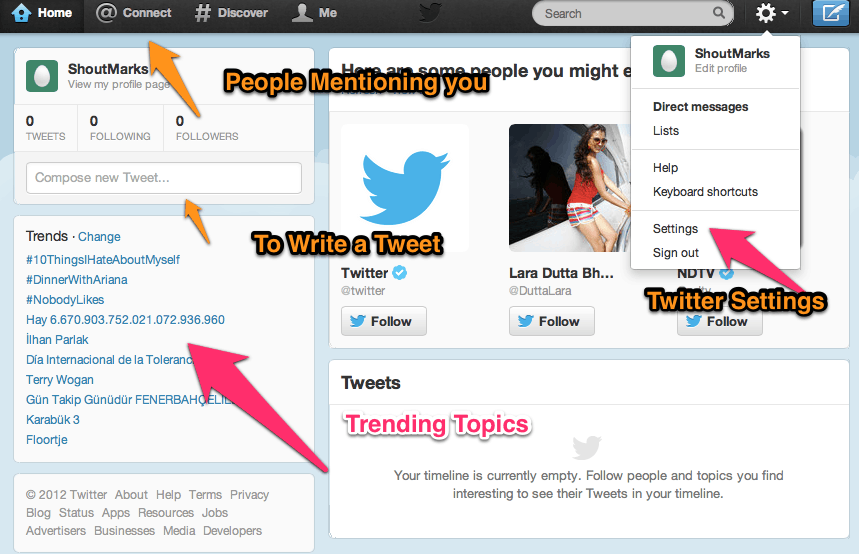
You will receive an email from the Twitter verification team, click on the link in the Email to verify your account. Do remember, this is an important step. Once you verify your account, you will be taken to Twitter home page, and you will be logged into your Twitter account. You will see something like this (below screenshot):
Complete your X (formerly Twitter) Profile:
So far, you have created your Twitter account, but it’s like a blank canvas. You need to add information to make it beautiful and personalize it. The very first thing that you will be doing is, filling out important information about your or your brand by clicking on the Settings button. You can read about What to write in Twitter bio to understand what kind of information you should write here.
One big mistake that I have seen many users are doing is; protecting their Tweets by selecting the check box under Twitter privacy. I recommend you not to use it because once you use the “Protect my Tweet feature”, other users can’t see your tweets until you allow them to follow you, and you miss out on a big opportunity of reaching out to the masses.

Click on the Profile section and enter all details. I highly recommend you to use your Website URL in the biofield, as there are many Web services and Twitter directories that indexes Twitter profiles, and you get the benefit of the free backlink.
How to start using X (formerly Twitter)?
The next step is to learn how to use Twitter, and you should be aware of basic Twitter lingo and abbreviations. I will explain a few below and link out to some of the best Twitter resources on the Web to learn about using Twitter.
- Tweet: Twitter status update within 280 characters termed as the tweet.
- RT (Retweet): When someone retweets a Twitter update.
- @reply: When you wish to send a public message to someone, you use @username to write a Tweet. Ex: @denharsh, your message
- DM (Direct Message): When you want to send a Private message to someone, you use DM.
- #Hashtag: Adding a Hash sign before an important Keyword in your Tweet message will help your tweet to be discovered better in the search. Ex: Hi, I’m Harsh, and I Blog about #WordPress and #SEO.
- Twitter Handle: Your username is the Twitter handle. Ex: denharsh
Here are some of the best Twitter resources from the Web to get you started like a Pro on Twitter:
You might need to spend 1-2 quality hours to understand the basics of Twitter, but once you have understood all the basics, you will be able to use Twitter effectively and for your success.
I have tried covering the most basic questions here, and if you still have any questions about Twitter, feel free to ask me via comments. If you enjoyed this article, feel free to share it on Twitter.







I would really like to open up a second twitter account. I have a political twitter, but would like another twitter page dedicated to other non-political content. BUT, every time I try to open another account, it keeps returning me to my existing twitter page. I’ve looked at every article on setting up a new account, but nothing addresses allowing me to have an existing twitter page and opening a new one. PLEASE HELP!
HOW DO I OPEN UP A SECOND TWITTER ACCOUNT??
Hey Tresa,
Read this:http://www.labnol.org/internet/one-email-for-multiple-twitter-accounts/9492/
Very nice tutorial n making twitter account even though i’ve just started using twitter it is giving some traffic on my blog which i expect will raise as my followers will.. and there are few things that i’ve learned from your post that i didn’t knew before