

Video marketing is the future of content marketing, and one should integrate it to multiple places. When ever I create a new video, I share it on multiple social platform including Youtube, Facebook page and Google plus. Now, when ever I’m writing a related article on my blog or any other website, I use those videos and embed it within a blog post. Specially, it’s a great idea if you directly embed Facebook videos on your blog as it gives another way to market your videos and your Facebook profile and page.
Earlier, one has to play with the codes and all to embed a video from Facebook on a page, but now Facebook has streamlined the process and made it easier for anyone to share videos from Facebook on their web-page. Specially if you are using WordPress, it will be very easier for you to add any Facebook videos or post inside your blog post. Here I’m sharing two quick tips that will help you to add any videos from Facebook to your Web-page. Depending upon what blog platform you are using, you can pick that trick from here. Facebook is a community of real human so videos which got likes can’ be fake. More over the quality of videos which are shared on Facebook are better than any other video hosting website.
Embedding Facebook video on your Webpage
One important think which you should keep in mind before adding a Fb video on your webpage is: The privacy of post should be set as public. Now, all you need to do is get the URL of the shared post and simply copy paste the URL within the blog post (WordPress only). Here is what WordPress users need to do:
Go to Facebook posts & copy the URL of the video post. You can copy it by clicking the time stamp or the URL in browser tab.

And paste this in WordPress editor. WordPress will automatically embed the complete post. However if you don’t want to embed the complete list, you should use the below method.
For non-WordPress user, you should use the second method. But first let’s look at how you can use the first method in two parts:
Adding videos from the direct video:
So you see someone sharing an amazing video and you want to share it with your readers on your website. Here is what you can do, play the video and click on options and grab the embed code. See the screenshot for better understanding:

This will bring the embed code which you need to grab and paste it in your website. You can also customise the width of video to match your website width.

That’s it, and below you can see the result after pasting the code on your webpage (Note: You need to add the code in HTML part of your blog).
You can also configure the advance settings for embed using official Embedded videos page of Facebook. You can access it here.
This 2nd trick is also useful for promoting your own page or personal profile. All you need to do is, click on the share button on the video and share it on your Facebook profile or Fan page.
Now, on the page click on either time when the post was shared, or hover your mouse on the post and from drop down select embed post to grab the code. For example, this is the URL of my status as shown in below image and I have copied and pasted it below to embed Facebook video along with post without any tech-hassle.
https://www.facebook.com/Shoutmeloud/posts/758086737553430
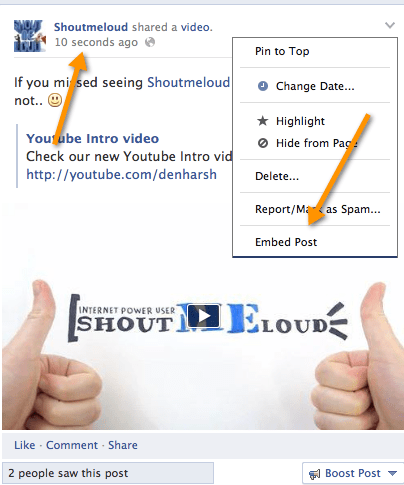
That’s it and now you have learned to embed Facebook videos on your webpage. I will also be doing a video tutorial on the same soon, you can subscribe to my Youtube channel to get notified for the same. For now, if you find this tutorial useful, do consider sharing this post on Facebook and Twitter. Have a question? Feel free to ask via comments.





When embedding videos in facebook, I see there is a lagging while youtube videos are uploaded at once. I had to create a kind of “… Uploading Video …” message to inform my audience there is a video on its way.
Thanks for sharing 🙂 I wondered for a long time how to do this. My Facebook is what I use mostly for personal things and now I can integrate my videos in the blog.
Yes, indeed it is quite usefull. But I embed the videos in a little different way. 🙂
Wow, Embedding facebook videos is possible.. I will definitely embed FB videos but by Speed and customization Youtube is the best
you are right. Facebook videos slower than youtube so, youtube is best 🙂