
| Plugin | Key Features | Pricing | Direct Link |
|---|---|---|---|
| 1. LinkWhisper | ✓ Smart internal linking tool ✓ Keyword auto-linking ✓ In-depth internal links reporting ✓ Fix broken links | $77/year | Download |
| 2. Interlinks Manager | ✓ Analyze internal links ✓ Calculate link juice ✓ Interlinking suggestions ✓ Create automatic internal links | $39 | Download |
| 3. WordPress default | ✓ Default WordPress feature ✓ Hyperlink text in the post | N/A | Learn More |
Interlinking blog posts is one very important parameter of on-page SEO. It improves the contextual score of your blog and also helps in ranking higher in the search engine.
I have seen many bloggers rely heavily on the related posts section for interlinking, which is not the best solution. To make your on-Page SEO and on-site SEO strong, you should have proper internal linking between your blog posts.

Link Whisper is the best internal link building WordPress plugin. It offers featuers that will help you improve your internal links within hours, if not days.

In WordPress, there are various ways to interlink your blog posts, and in this guide, I will share all the best plugins that you can use right away.
Most of the solutions listed below are free and only one of them is paid, which I use for all my blogs.

Before I share WordPress interlinking solutions, let me quickly share what are the direct benefits of interlinking your articles:
- Crawling and Deep-Indexing: Interlinking helps search engine bots to crawl and index your articles effectively.
- Bounce rate and more page views: Right interlinking helps reduce the bounce rate to a great extent. The only key here is, that your internal linking should be relevant.
- Passes link juice: It passes link juice from one page to another. This is one reason, I highly recommend to link from your old articles to a recent one.
- On-page SEO benefit: Interlinking also helps in on-page SEO.
Now, let’s look at all the solutions for WordPress bloggers to interlink their blog posts like a pro.
Best WordPress Interlinking Plugins and Tricks
1. LinkWhisper
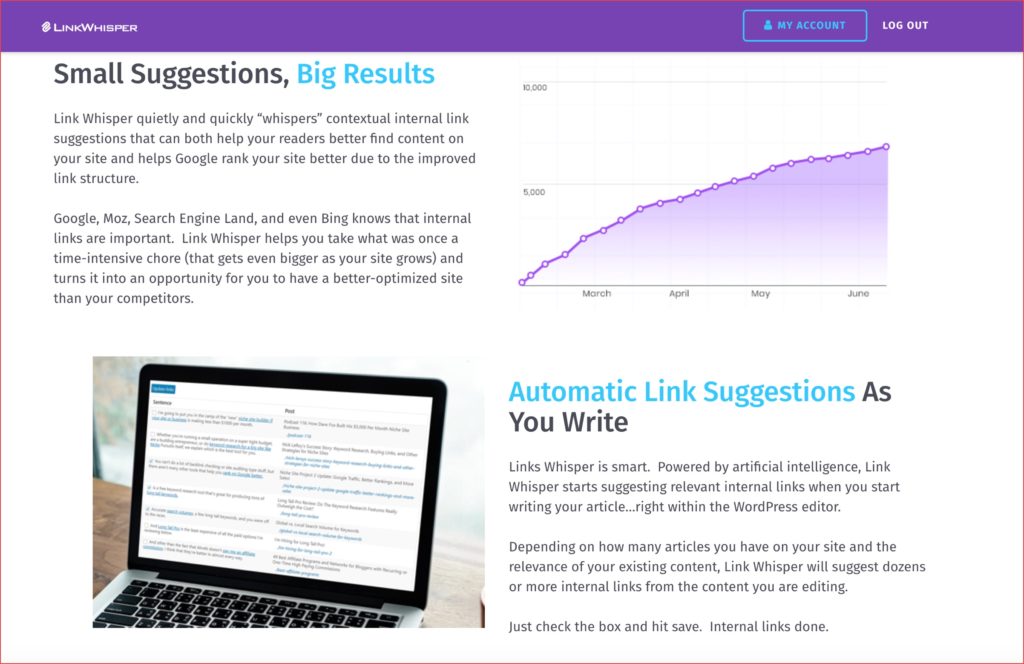
Link whisper is the most advanced interlinking WordPress plugin available in the market. The beauty of the plugin is, that once you install it, within seconds it will scan all of your WordPress websites and start suggesting words that you could link to.
This is a unique plugin that helps in improving the internal link of WordPress.
($15 discount Coupon code: ShoutMeLoud)
Watch the below video to learn how the LinkWhisper plugin helps in Internal linking SEO:
2. Interlinks Manager
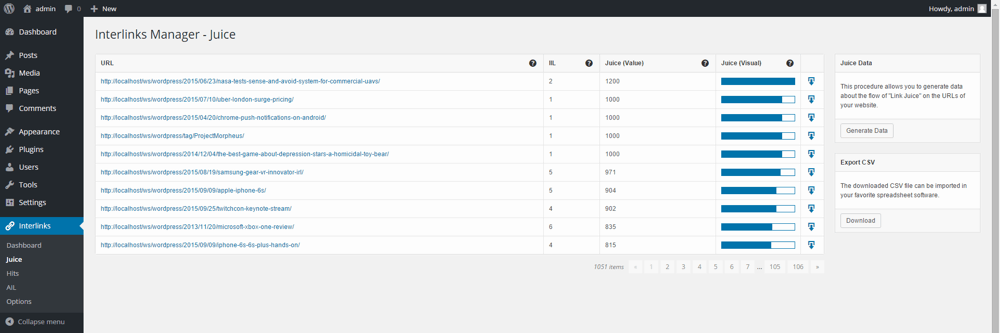
This is the modern auto internal linking plugin for WordPress which is also Gutenberg-ready. Interlinks Manager plugin offers the following features which you would require in 2023:
- Calculate the link juice
- Set words to automatic link to link of your choice
- Include/Exclude custom post type
- Suggest internal links in the post-editing section (This is super useful)
- Track the internal links
- Export data to CSV
3. WordPress default search & interlink
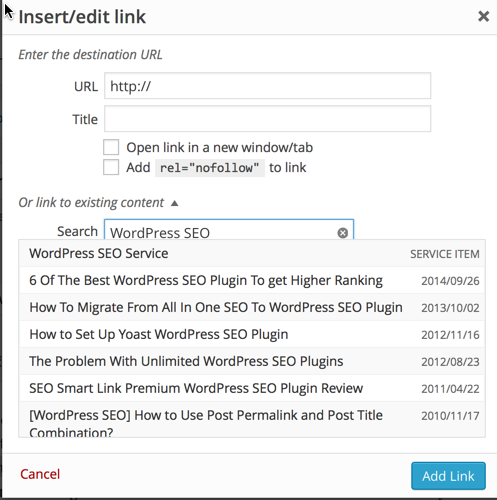
WordPress also offers a default feature to let you quickly interlink your blog posts. Whenever you select a text and click on the hyperlink to add a link, you can search for your published post from there and link it directly to the anchor text.
This is a default feature of WordPress and it’s very useful.
Update: Yoast premium can also be used to improve internal linking. However, it’s not automated but worth looking at. You can read about it here.
Conclusion: Which is the best plugin for interlinking blog posts?
I currently use a combination of Linkwhisper + Yoast SEO Premium to manage internal linking. The manual internal linking offers better relevancy and LinkWhisper matching engine makes it easier to do just that.
There are a few more plugins that are available, but these are the best solutions that you can use for WordPress interlinking. Do let me know what strategy you follow for blog posts interlinking.
Don’t forget to share this guide with other bloggers, as it would help them to understand the importance of interlinking and how to do it.
Here are a few more hand-picked articles for you to read next:
- How To Set Up Yoast SEO Plugin [Updated]
- How To Change Post URL of Already Published Post Without Losing Traffic
- WordPress SEO Tutorial (From Beginner to Advanced Guide)



![How To Set Up A WordPress Blog [Checklist]](https://www.shoutmeloud.com/wp-content/uploads/2020/10/Checklist-Set-Up-WordPress-Blog-431x230.jpg)

I am using SEO Smart link Premium plugin from around 2 months and I can see my job has reduced drastically and I can now focus on other things as this plugin works like a charm.
Initially I relied on a plugin that I found in WP directory of plugins when searched for an interlinking tool. That plugin turned out to be a hell literally. May be, either I didn’t know how to use it or it was by default complicated. It picked out any term from a said post and interlinked whatever the link from within the similar category. The plugin even didn’t spare ‘and’ ‘or’ and ‘with’ . When I noticed the chaos, I uninstalled it.
Now, as you suggested me these 4, let me check if they could be life saving. Thanks for pioneering. Have a blast Harsh.
hi Harsh,
its been 2 days now I m following your blogging tips for my blog and they are very helpful thank you for these posts I will be using the interlinking on my blog too.
Hi harsh,
Thanks again for this wonderful article, I really want one plugin which helps for internal linking I think these all plugin work properly because I don’t know more about interlinking.
Till now, I used to make it on a manual basis. Thanks for sharing such a beautiful plugin.
Thanks for such great advice, one thing I want to know, when ever I use interlinking, I get a new comment in comments section which appears this post link as new comment. Should I approve that comments? Did you get what I mean? In other words, when I interlink my older post in my new post. and publish it, I got a comment for moderation. Why I get this and Is it harmful to approve or not?
Kindly help me I am really confused on this matter.
@Zubi
You should use No self ping WordPress plugin https://www.shoutmeloud.com/no-self-ping-wordpress-plugin-stop-pinging-your-own-blog-post.html
Harsh, thanks for your answer, but why I should use No self ping plugin. Is there not other way, I am asking this because I don’t think every website is using this? I already have lot of plugins in use but will it not effect on my page load speed when I have lots of plugins.
How other blogs deal with it? and sometimes I tried to find plugins from others blog views source, I can’t see they are using much plugins but they are all set.. Please guide me. My 6 months old blog ranking is suddenly decreases without any error in webmaster tools, I think its because I am doing inter post linking a lot with self ping as well.
Sorry I wrote too much 🙂
@Zubi
This is plug & play plugin & doesn’t affect load time. I have been using it from past 8 years.
Thanks for answering. I appreciate your are replying everyone possibly.