
| Plugin | Key Features | Pricing | Direct Link |
|---|---|---|---|
| Shareaholic | ✓ Easily add related posts on your site ✓ Customize with the content dashboard ✓ Add or remove any post, tag, or category ✓ Optimized for mobile devices | Free | Download |
| YARPP | ✓ Advanced customizable algorithm ✓ Inbuilt cache makes it super fast ✓ Pre-built list and thumbnail template ✓ Flexible placement options | Free | Download |

One of the simplest ways you can decrease the bounce rate of your blog is by helping your readers take action after reading the post. In simple words, make your readers stick to your blog by giving them the option of what to read next. Think of related posts as the next course of action for your readers. When a reader is done reading your article, he needs something more to read and it works best when it’s related to your topic only.
One of the easiest ways to achieve this is by adding a related post widget after your blog posts. There are many options available in WordPress plugin repo, and I have listed down the best ones from my experience. You can use any one of these and you can notice a considerable amount of decrease in your blog bounce rate.
Moreover, most of these plugins have options to configure how your related posts should be shown. You can show them with or without thumbnails, and can also pick the related posts option from different design options.
Best Related Posts WordPress Plugins with thumbnail
There are third-party services that do this job pretty well and without the requirement of coding knowledge, but it give very little or negligible SEO value, as all your related posts are not directly linked. Here are a few plugins, that you can use to show related posts with thumbnails after your blog posts and are SEO friendly too. These related posts improve your internal linking and improve your ranking.

Update: I’m updating this post with new plugin suggestions. For now, here are new direct links for suggested related post plugins. Will update the details about them in coming days. Apologies for the delay!
1. Shareaholic plugin

Shareaholic was initially a social media sharing button plugin and recently they have revamped the plugin to add a related post feature. Surprisingly their algorithm is quite accurate in suggesting related post which is relevant to the post itself. I have tested this plugin on ShoutMeLoud and it looks pretty awesome.
To enable the feature, you need to download the free plugin from WordPress repo over here, go to Shareasholic plugin settings, and enable the feature.
You can show related posts with thumbnails below posts, pages, categories, and index pages. Every option can be configured manually and you can also customise the look of related posts to match your blog design. You can also exclude certain posts, and pages to be shown from related posts. The exclusion feature also supports wildcard, so you can quickly remove any existing category or tag posts to be shown from related posts.

You can also use the Shareaholic plugin to add social sharing button below posts or floating buttons. Moreover, this is a good plugin when you need both the features of social sharing and related posts.
2. YARPP
YARPP a.k.a Yet another related post plugin uses many factors to show related posts and this is a plug and play WordPress plugin.
YARPP can be also configured to show related posts in the feed which is very useful for getting extra clicks from your feed readers.
Especially for a huge blog, this is one of the best related post plugins for WordPress as it uses the caching mechanism. This means plugins will not keep generating related posts on the fly, instead once related post is generated for a post, it will show it from the cache, which stops this plugin from increasing php calls.
Once you are done installing the YARPP plugin, you can access its settings panel under Settings > Related Posts(YARPP)
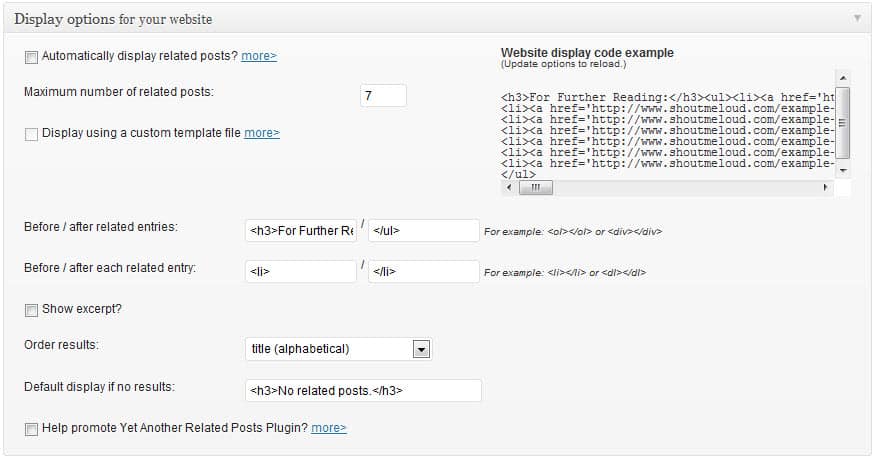
You can automatically enable to show related posts or you can use custom code to show related posts at specific place. YARPP can also be configured to show related posts with thumbnails by using a custom template.
You can scroll down further on the settings page, you can configure various options for showing related posts in the feed. I will highly suggest keeping the description off as it makes related post looks like little busy.
In case, if you maintain one such category or tag which you don’t want your readers to see again in related posts, you can exclude such categories or tags. I would suggest you create a specific tags for outdated content and exclude it using this plugin.
This way, your readers will see only updated and useful content. You can also exclude pages to show as your related posts. One more reason that this is one of the best related post plugins is because, in the last 1 and a half years, this plugin has gone through lots of iterations and is constantly updated and compatible with the latest WordPress version.
Showing related posts below blog posts is one of the easiest ways to decrease the bounce rate of your blog and if you are running a WordPress blog, YARPP is one of the easiest ways to add related posts to your WordPress blog.
Now, many premium WordPress themes come with the in-built feature of showing related posts along with a thumbnail, but when you are using free themes, such plugins are a life saver. Optionally, if you are good with PHP and CSS, you can look for some resources and tutorials on the Internet to code it yourself.
I’m stilling looking for one such related posts which work with custom post types and can be configured to show related posts from specific custom post type only. If you know of such a plugin, let me know via comments. If you enjoyed reading this resource, do share it with other WordPress bloggers.
Also, read:
- 6 Best WordPress A/B Testing Plugins To Split Test Your Site
- 6 Best WordPress Translation Plugins For A Multilingual Website
- 7 Best WordPress Image Compression Plugins Compared





Hey, Harsh
Thanks for the post. I just installed shareaholic.
Hi Harsh – Great blog! It’s added a lot of value to me.
I’m looking for a plugin that allows me manually to select up to 3 posts to display at the end of the current post. I want to control exactly which posts the viewer sees.
Ideas?
Tks,
Chris
Thanks Bro great lists of Related Posts WordPress Plugin. i personally like Zementa related posts wordpress plugin is easy to use ….
I am presently using YARRP for my blog. Would you suggest a switch? YARRP supports thumbnails as well though there are quite a few posts on my blog that do not have accompanying images as thumbnails.
Thanks a Lot Harsh !!
I am searching for that perfect plugin for my blog from many days
Today by your post i get to know about ShareaHolic plugin and i am just loving it
Now lets see what happens !
Hoping this plugin will going to help me
Hie Bro
Hope you are doing good 🙂
Is There any problem monetizing with Related post Sharholic along with Adsebse ?
Please let me know ..
Thanks!
Hi Harish, I am a beginner. I find your site very helpful in setting up my new website. I used Shareaholic but it inserted spam posts in to my related post area. So I had to remove the plugin immediately. Shareaholic is not recommended at all.
Hi KJ, Share-a-holic has an option through which you can earn money by displaying foreign articles on your blog’s recommended posts.
You can disable those foreign blog posts on your blog just disabling those monetizations about which you can find info. in the share a holic help. Initially I got confused with this issue, but later I realized that this was happening because I have switched on monetization to earn some $$$ through shareaholic.
Hope this helped you.
ShareaHolic looks good. I’m trying for some days but i’m looking for category related posts. This one dont’s use the category to list the related.