
Gmail is an amazing mailing service which comes with plenty of useful and innovative features. Gmail Lab is a perfect example.
There are also lots of features available that make Gmail completely different from every other mailing service out there.
Here’s a scenario:

Being a blogger, I have multiple Google Apps accounts (Gmail for domains), but logging into all of my email accounts at once is time-consuming. I would really like to use just one email address for everything.

“Everything” includes reading all incoming emails in one account and being able to reply to emails coming into all of my accounts from one email address.
Well, Gmail lets you send messages with another one of your email addresses. With this feature, you can send email from your Gmail account and it will look like it was sent from your other account.
Your “Sent from” address will be seen by the receiver as your other email address instead of your Gmail address.
How To Add Another Email Account To Gmail:
1) Go to your Gmail Settings by clicking on the gear box on the right & selecting “Settings”.
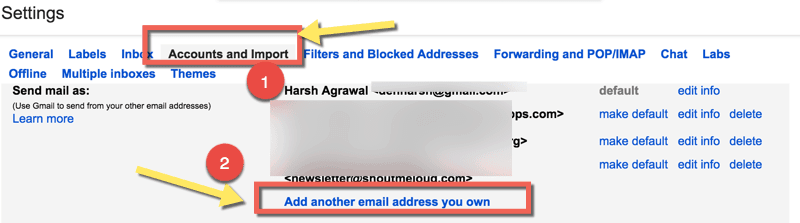
2) Click on the “Accounts and Import” tab. In the “Send mail as:” area, click on “Add another email address you own”.
3) In the name field, enter your full name. In the email address field, enter your email address from which you would like to send mail from.
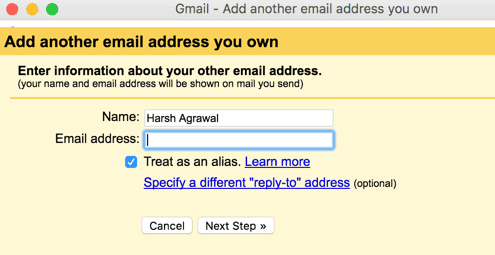
4) When you enter your email address, Gmail will send a verification message to this email to confirm that you are indeed the owner of the account.
5) You then need to enter the verification code sent to this email address and click on “Verify”. Or just open the email from Gmail and click on the verification link.
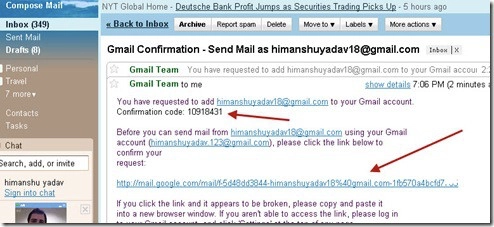
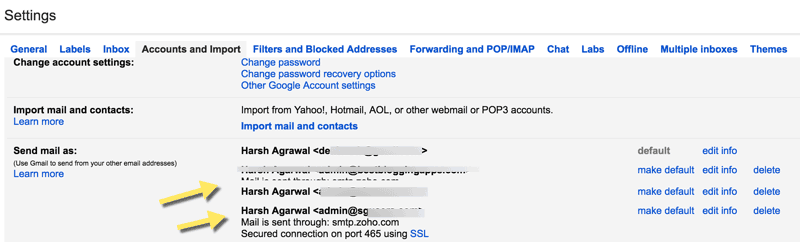
6) After verification, a new email address will be available in your “Send mail as:” area.
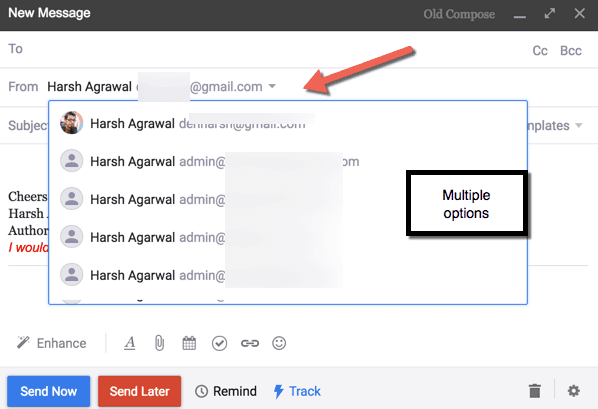
Now, whenever you compose an email, you will have a new option in the “From” field. Simply click on that email address, and that’s the address that your receiver will see.
You can always edit or delete any email address you’ve added in Settings > Accounts> Send mail as.
So go ahead and enjoy this great Gmail feature. I currently have around 10 email accounts that I manage from my main Gmail account. It makes everything so much easier.
What do you think about this awesome feature from Gmail? Let me know your thoughts in the comments below!
Don’t forget to share this guide!